1.Use the"original chargers"or"manufacture-approved chargers". The third party chargers are also good if their rating is same as your original charger.DON'T USE cheap chargersoroff- brand chargers.But most of the chargers have: Must Read:How to put mp3 on iPhone ?
*Normal Voltage for chargers in mobiles is 5 Vand for in laptop it is 20-25 V.
2. Most of the phones are smart as they have digital circuit breaker and it cuts off charging when a battery is at capacity. However, avoid charging your phone all night, at least for every night to increase the life span of battery.Jihosoft iPhone Backup Extractor Extract and recover all types of data from iPhone backup files, such as camera roll photos, videos, SMS, contacts, reminders, WhatsApp, and etc.
Gihosoft Free iPhone Data Recovery is a professional iPhone Data Recovery software to get back all your lost text message, photo, video, call history, note, contact and more from iPhone/iPad/iPod Touch.
3. Lithium-ion batteries heat themselves, and get hotter while they're being charged. Similarly Cold weather can also have a negative impact on a phone's life, and a cold battery will die faster than usual in low temperatures. Your phone will be safe andWould NOT Explode if you keep it within its recommended temperatures.
Fast charging mobiles usually gets heated while charging but its absolutely normal.
4. Your battery life will last longer if you keep your phone charged between the range of 20% and 80% charged.Avoid charging out of this range !
Avoid charging to extreme (100% charged or 0% charged), it would reduce the life span of the battery.Also avoid charging 40% - 60% charged to reduce the charging cycles as there is a limited number of charging cycles. Must Read:How to put mp3 on iPhone ?
The Samsung Android-based Galaxy S8 smartphone is available with a new peripheral that will let it function like a virtual Windows desktop running Office 365 natively.
In a strange bit of irony, both Microsoft and Samsung are hoping that the new Samsung Galaxy S8 and its larger sibling S8+ phones catch fire. Not in the same way its predecessor, the S7, literally caught fire due to a flaw in the battery design, forcing Samsung to take the phones off the market and costing the company billions of dollars in losses.
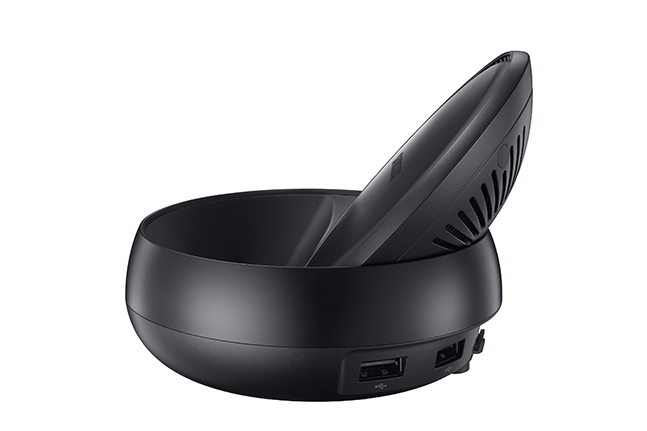
So far, the new Galaxy S8 is hot among consumers for its ultra-thin form factor, bright display called Infinity, its Bixby intelligent assistant and improved camera. But Samsung also is looking to spark demand among commercial and enterprise decision makers. At the April launch of the Galaxy S8, Samsung threw in a surprise: the optional DeX Station, a small peripheral that lets users connect a keyboard, mouse and large-screen monitor to use the phone as a full-fledged computing device. Samsung is making a strong push to make the Galaxy S8 bundled with the DeX Station not just appealing for home users and millennials as a complete computing solution, but for workplaces of all types, as well. To what extent IT embraces the Samsung bundle as a PC or virtual desktop alternative remains to be seen, but there are promising early signs the Samsung offering is a viable alternative to a PC in certain environments.
Samsung isn't just hoping demand will come organically or from grass-roots deployment. The company is pushing its smartphone bundle for commercial and enterprise customers. "Turn your phone into a computer," the headline for the ad promoting the Galaxy S8 prominently states. Perhaps most striking about this is the fact that Microsoft is completely on board with Samsung's initiative. Not only isn't Microsoft fighting back, it's now selling the new Galaxy S8 phones and DeX Stations in its retail stores and has created native support for the entire Office 365 suite on the devices. Samsung even used last month's Microsoft's Inspire conference in Washington, D.C., to promote this opportunity with Microsoft's partners. The Galaxy S8 and DeX Station can work as a standalone but in targeting it for businesses, the company has optimized it to work with three Desktop-as a-Service (DaaS) offerings: Amazon WorkSpaces, Citrix Receiver used with XenApp Essentials and VMware's Horizon and new Workspace One digital workspace offering.
Upon docking the Galaxy S8 into the DeX Station, the DaaS of choice appears as an app, providing the virtual desktop experience. "I can work on it just like I am working on my laptop," says Abhinav Gupta, director of Samsung's Knox solutions. "When you look at it, it looks like a Windows experience. Everything is optimized for the desktop view." The review on p. 11 ("A Phone to Replace the PC?") of the Galaxy S8 using Citrix Receiver to present a virtual Windows desktop suggests it can function quite well running traditional apps. Citrix Systems Inc. CEO Kirill Tatarinov gave a nod to the solution during his keynote at the annual Citrix Synergy conference in late May. "This is really not just a mobile device that remains in its mobile form factor projected on a large screen, this is really a true, familiar desktop, delivered through Citrix onto [the user's] platform," Tatarinov said. "It's really an amazing, interesting form factor and we're really proud to be partnering with Samsung to deliver this new scenario to our customers. We are actually seeing tremendous interest in many customer conversations."
This idea of one day using a smartphone for everything you do on your PC is a long-held concept that has inched along over the years—making incremental progress but not suitable for critical mass. Even before Microsoft released Windows 95, the company was talking up software it was working on known as WinPad. Also known as Modular Windows, it was based on a subset of the OS code designed for handheld devices, then commonly referred to as personal digital assistants, or PDAs. WinPad never saw the light of day but the dream lived on, manifesting itself in recent years as part of Microsoft's "Continuum" feature built into the new single code base of the different variations of Windows 10. Continuum, in short, is what Microsoft now describes as the experience provided when connecting a Windows phone to an external display, keyboard and mouse. Indeed, the DeX, which stands for Desktop Experience, is similar to the dock Microsoft released a few years ago with its Lumia phones and, more recently, to the HP Elite x3.
Microsoft Support Considering the sub 1-percent installed base of smartphones running Windows and the fact that Microsoft has marginalized its Lumia brand, it's a far-gone conclusion that the company has thrown in the towel on Windows Phone. Speculation that a Surface Phone might be in the works has died down, though Microsoft hasn't officially said it's no longer working on Windows-based phones, perhaps hoping opportunities could open down the road. But its support for the Galaxy S8 is a tacit acknowledgement that Microsoft is refocusing its smartphone ambitions beyond Windows at the core. Indeed, Microsoft's support for non-Windows phones dates back several years when it released versions of Office for the Apple iOS and Google Android. Now that Microsoft's anchor offering centers around Office instead of Windows, its new multi-device support shift was a huge impetus for the company's Enterprise Mobility + Security (EMS) service, which provides configuration and policy management for smartphones, tablets and Windows PCs. Microsoft's support for the Galaxy S8 is indeed an opportunistic move, but it's more than just a bundling deal. Even though Samsung abandoned its own Windows Phone offerings years ago in favor of Android—playing a key role in the success for Google's mobile OS—Microsoft is working closely with Samsung, largely to help make the Galaxy a full-fledged computing device.
Naturally, the DeX has a key leg up over the Lumia and HP Elite x3 by virtue of the fact that the Galaxy is perhaps the most popular smartphone and a draw to anyone considering an Android phone. In addition to creating a native version of Office optimized for the Galaxy S8, Samsung and Microsoft have worked closely to integrate Knox, the mobile security component of Samsung's fork of Android, with Microsoft's EMS and, specifically, the Intune mobility management functions. Samsung was the first Android provider to allow Intune to support Microsoft's Workplace Join to Active Directory back in early 2014. Subsequently, Microsoft's support for Knox has extended to its Azure Authenticator app, Azure AD Groups and Office 365 management. Microsoft last year also said it would support Samsung's Tizen, the embedded open source OS software for its smartwatches and TVs based on the Linux kernel. Samsung said it would work with Microsoft on its open source projects, including .NET Core and Xamarin.Forms to enable .NET support for Tizen. Microsoft's first preview of Visual Studio with support for Tizen provided mobile phone capabilities using Visual C# and the second preview, called Tizen .NET, added the ability to use .NET and Xamarin APIs for television applications and included a new project wizard to facilitate the building of sample apps for specific devices.
Using the Galaxy S8 and DeX Station doesn't require significant redevelopment of apps, though they must be optimized for use with a larger screen, keyboard, and monitor by adding a few lines of code to new and existing applications, according to Samsung. DeX extends the functionality of both commercial Android applications and custom-developed corporate apps. The company said it's working with enterprise customers, ISVs and developers of consumer apps to enable the optimization of Android apps in a desktop-like environment. Samsung's Gupta said Microsoft has already optimized Office 365 for DeX.
DeX as an Alternative Gupta describes a number of reasons an organization might want to use the DeX solution as an alternative to a thin client or a PC, or perhaps as an adjunct. Certainly, in organizations that have unassigned workspaces or want to put the DeX Stations in common areas, it offers a more secure way for employees to access enterprise information. It's also suited for accessing enterprise data from home or the road without letting users pull data onto their own PCs, he said. Some companies are even looking at revisiting their broad bring-your-own-device policies, and putting forth recommended devices. Making DeX available is one way that organizations might encourage some users to choose the Galaxy S8, he said.
The DeX Stations cost about $150, but some carriers have offered promotional incentives that include the docks, which have Bluetooth support, two USB-A 2.0, a LAN Ethernet and HDMI ports, and a USB-C charging port. Samsung is also working to enable support from all of the key enterprise mobility and management (EMM) providers, as well as offer the ability for IT to control firmware over the air (FOTA) updates. "I have seen tremendous interest on the enterprise side where they are saying, 'Now I don't need to create a new image, work an image on my device, give a laptop to every employee or create a desktop and give it to an employee and then fix a desktop for the employee,'" Gupta says.
Even if you find that the notion of replacing a PC with a smartphone is far-fetched, it could gain at least some traction as a companion to a computer. A telltale sign that the DeX has potential in the workplace will be if Apple rolls out its own dock. Given Apple's history of launching new iPhones in September, the answer to the company's thinking on that could come soon. But Apple's response, or lack thereof, may not prove or disprove the likely success of Samsung's DeX offering until the market responds.
After downloading the software from the official website, the user must extract rEASYze from the ZIP file. Once unzipped, open the file using the Run as Administrator option for best performance. We tried opening the file the regular way, but instead of launching, errors came on the screen.
Now, once the program is up and running, we recommend taking a look at the two options available – Easy Mode and Pro Mode. Easy Mode gives limited options that are not ideal for basic image editors. It delivers the option to drag and drop images along with the regular way of doing things.
We recommend choosing Pro Mode since it shows a preview of the image along with its file format. When multiple images are selected, the software lists them to the right section of the preview pane. Clicking the name of an image displays it. If folks want to erase all images, just click on the X button.
Resizing an image is very easy in Pro Mode since the width and height options are readily available. Just input the widths and heights of your pictures and watch as they change before your eyes. Furthermore, the ability is there to modify the format of an image. The supported image format at this time of writing is JPG, PNG, TIF, GIF, and BMP.Must Read:How to download kik videos ?
Interesting in adding filters? No problem, just keep in mind only Sepia and Gray filters are supported here.
After making all the necessary changes, click on the button that says “Start” and move on from there. We should point out that it’s possible to add all the changes even before adding the images to the pane.
The bad things
Want to know the size, width, and height of a picture? The program requires the user to hover their mouse over the image to learn of this vital information. We believe everything should be at the forefront, especially when dealing with multiple images.
At the end of the day, great program, just a little bit too simple, even for computer users with core competencies.
Jihosoft iPhone Backup Extractor Extract and recover all types of data from iPhone backup files, such as camera roll photos, videos, SMS, contacts, reminders, WhatsApp, and etc.
Gihosoft Android data recovery Freeis a super awesome software specialized in Android file recovery. With this program, you are able to recover deleted photos, music, videos, messages, contacts, call logs, WhatsApp messages, Viber chat history and more from Samsung, Huawei, LG, HTC, Motorola, Google, Oneplus, Sony, Lenovo, ZTE and other Android devices directly. Meanwhile, this Android data recovery software is available for both Windows and Mac platforms.