Wednesday, 7 August 2019

Download iOS 13 and iPadOS 13 Beta 6


With the public release of iOS 13 and iPadOS 13 just over a month away, Apple today released the sixth developer beta of iOS 13 and iPadOS 13. The new developer beta of both OSes lands just 10 days after iOS 13 and iPadOS 13 beta 5 was released.

iOS 13 and iPadOS 13 beta 6 are unlikely to bring any major new changes. They are likely all about fixing the bugs and improving the stability of the OSes before their public release in September.

Since the public release of iOS 13 and iPadOS 13 is close, Apple will now move to a weekly beta release cycle from its previous timeframe of releasing one beta every two weeks. Instead, the company will now release a new beta of iOS 13 and iPadOS 13 every week until the first week of September.
Download iOS 13 and iPadOS 13 Beta 6

If you are already running iOS 13 Developer Beta 5 on your iPhone, you just need to go to Settings -> General -> Software Update and download the beta 5 OTA. The same steps are also applicable for downloading iPadOS 13 Beta 6.

Apple will also release the third public beta of iOS 13 and iPadOS 13 to developers later this week.
iOS 13 Features

iOS 13 comes with a number of major new features including a redesigned Reminders app, faster Face ID, system-wide Dark mode, improved Safari, and more.

1. Dark Mode

A system-wide Dark mode is probably the highlight of iOS 13. It stretches from the Lock screen to the widgets screen to Apple’s own apps. Even the keyboard gets a better version of the dark mode. Dark mode can be enabled easily from the Control Center.

2. New Reminders App

There is a new smarter and enhanced Reminders app in iOS 13. It uses Natural Language Processing which makes it easier to add reminders and tasks.

Read: iOS 13 Reminders App Hands-On

3. Redesigned Volume HUD

The new Volume HUD appears in the top-left corner of the screen in an unintrusive manner. It first shows up as a full-sized slide. But it immediately shrinks and becomes unintrusive.


4. Improved Safari

Safari has received a major update in iOS 13 and iPadOS 13. It now features a dedicated Download manager which means one can now use the browser to download files.

On iPadOS 13, Safari will now load the desktop version of websites to offer a better browsing experience.

5. QuickPath

The stock keyboard in iOS 13 has finally gained gesture-based typing known as QuickPath. This is similar to the swipe-based typing experience offered by SwiftKey and Gboard.

➤ You can read more about all the new features in iOS 13 over here.


If you have found any major or minor changes in iOS 13 beta 6 not mentioned above, make sure to drop a comment and let us know about it!

If you lost data after you updated to a new iPhone, you can always use Gihosoft iPhone Data Recovery to get the data back from the old iPhone or backup.You may also like: iphonerecovery.com

iPhone 11 Max Looks Drop Dead Gorgeous in This Concept Renders


The iPhone 11 and iPhone 11 Max have leaked in detailed CAD renderings thereby giving us a look at how the handsets will look. While the final product will have a more refined look, there’s no denying the fact that the 2019 iPhones are not going to bring anything new to the table in terms of design. Until Apple gets around to releasing the iPhone 11 series officially in September, we have some concept photos of the iPhone 11 Max from designer Hasan Kaymak to drool over.

The renders show the triple rear cameras on the iPhone 11 Max and envision the handset in a striking bold red color. The shade of black is also different and it looks more stealthy than the Space Grey color which Apple currently offers for the iPhone X/XS series.


The renders also envision iOS 13 with Dark mode which does look striking. Thankfully, leaks have already confirmed that iOS 13 will indeed come with a dark mode.

The iPhone 11 Max in the renders definitely looks slick but one must remember that these are renders. The real product is not going to look as slick, though with Apple rumored to use frosted rear glass panel on 2019 iPhone 11 series, they will at least look different from the iPhone X/XS series.

What do you think about the iPhone 11 Max as shown in the renders above? Will you buy one if the final product looks anything like this?

[Via Hasan Kaymak]

Sponsor ads:

Gihosoft RePicvid Free Photo Recovery Software provides a free photo recovery software for windows to help users recover the deleted or lost photo for free.

If you lost data after you updated to a new iPhone, you can always use Gihosoft iPhone Data Recovery to get the data back from the old iPhone or backup.You may also like: iphonerecovery.com

If you use android phones, please choose Gihosoft Android Data Recovery.With Gihosoft Android Data Recovery, no longer afraid of data loss!

iPhone Manager:Get the ultimate Gihosoft iPhone Manager. Free download for PC/Mac.


iPhone XR vs Galaxy Note 10 Comparison: Which is Better for You


Samsung is playing the value card this year with the Galaxy Note 10. By making it the smaller brother to the Note 10+, Samsung has cut some corners and removed certain features to launch the Note 10 at a lower price point. This way the handset is able to better compete with Apple’s own budget flagship, the iPhone XR. If you are wondering between the Galaxy Note 10 and iPhone XR, which one is better, read our detailed comparison below.

The Galaxy Note 10 does carry a higher retail price than the iPhone XR. However, knowing Samsung, you will find the phone with some extremely attractive trade-in offers or discounts that will bring its price close to what the iPhone XR is priced at. This makes the duel between these two devices even more interesting.

Below is how the Galaxy Note 10 compares to the iPhone XR.
iPhone XR vs Galaxy Note 10 Comparison
Design

Both phones are made of glass and sandwich an aluminum chassis. While the Note 10 is just a smaller version of the Note 10+, Apple has made a few other changes with the iPhone XR. They both feel premium in-hand, have excellent build quality, and feature wireless charging.

The Note 10 does have a higher IP68 certification while the iPhone XR tops out at IP67. Nonetheless, for daily use, the IP certifications of both devices are more than good enough.

The Note 10 lacks a notch since it has a centered hole-punch selfie camera. The notch on the iPhone XR is not really distracting, though many users might not like it. The Galaxy Note 10 comes with an S-Pen as well which is IP68 certified as well. It now has Air motion which allows you to control many aspects of the phone via simple motion gestures. This has been made possible by including 6-axis gyroscope and accelerometer inside the S Pen.


Display


iPhone XR – 6.1-inch True Tone Liquid Retina LCD display, 1792 x 828 pixels (326 ppi), No 3D Touch


Galaxy Note 10 – 6.3-inch curved Infinity-O Dynamic AMOLED, 2280 x 1080 pixels (401ppi), HDR10

The Galaxy Note 10 does not come with the same high-resolution panel as its bigger sibling the Galaxy Note 10+. Yet, the Dynamic AMOLED panel on the Galaxy Note 10 is easily among the best in the market. The iPhone XR’s 6.1-inch Retina LCD simply pales in comparison. It is the best LCD display around but its no match for the Note 10’s OLED panel.
Chipset


iPhone XR – 7nm A12 Bionic chipset


Galaxy Note 10 – 7nm Snapdragon 855 or 7nm EUV Exynos 9825

Depending on where you live, the Galaxy Note 10 comes with either a 7nm Snapdragon 855 or Samsung’s own Exynos 9825 chipset. The Galaxy S10 was also powered by the Snapdragon 855 and it is currently the best chipset available for Android devices. There’s a newer Snapdragon 855+ that was recently unveiled by Qualcomm but it is just an overclocked version of the regular chip.

As for the Exynos 9825, it is an updated version of Samsung’s Exynos 9820 found on the international variants of the Galaxy S10. It is the first chip to launch on Samsung’s 7nm EUV fabrication process. This should make it more efficient than the 8nm Exynos 9820. Despite this though, the chip is not better than the A12 Bionic in raw performance.

One area where the iPhone XR truly shines is in terms of performance. It might be a watered-down version of the iPhone XS but it packs the same A12 Bionic chip as it. The Galaxy Note 10 is fast but the A12 Bionic inside the iPhone XR is at a different level altogether.
RAM & Storage


iPhone XR– 3GB RAM | 64GB, 128GB, 256GB


Galaxy Note 10 – 8GB RAM | 256GB

The Note 10 is not as packed as its bigger sibling in this regard. Yet, it is miles ahead of the iPhone XR in this regard. The Note 10 comes with almost 2.6x times more RAM than the iPhone XR.

While both phones top out at 256GB storage, the iPhone XR ships with 64GB of base storage. The Note 10 ships with 256GB base storage. Unlike other flagship Samsung smartphones, the Galaxy Note 10 lacks a microSD card slot though which means you cannot increase its storage down the line for cheap.
Camera


iPhone XR – Single 12MP camera setup with f/1.8, 1.4um large pixels, OIS, Smart HDR, Focus Pixels, Portrait mode with advanced bokeh and Depth control


Galaxy Note 10 – Triple-camera setup, 12MP camera with variable f/1.5 – f/2.4 aperture, 1.4um pitch pixel, OIS; 16MP f/2.2 ultra-wide angle shooter; 12MP f/2.1 telephoto sensor with OIS, 2x optical zoom, Auto HDR, Super Speed Dual Pixel, Live Focus with adjustable bokeh effect

The Note 10 again beats the iPhone XR by miles in this regard. While the latter only ships with a single 12MP shooter at the rear, the Note 10 comes with a triple-camera setup. The image quality of both phones are almost at the same level but the Note 10 offers a greater level of flexibility that is missing on the iPhone. The telephoto lens and the ultra-wide angle lens on the Note 10 offer a greater degree of flexibility that photographers will enjoy.


Biometrics


iPhone XR – Face ID


Galaxy Note 10+ – In-display fingerprint scanner, Face unlock

The iPhone XR comes with a specialized TrueDepth camera system at the front for Face ID. While Face ID is generally reliable, its reliability is nowhere as close to Touch ID.

On the Galaxy Note 10, Samsung uses the front 10MP camera for face unlock. This is complemented by the ultrasonic in-display fingerprint scanner. While Samsung offers more choice, its solutions are not as secure as Face ID. Both face unlock and the under-display fingerprint scanner on the Note 10 can be fooled relatively easily.
Connectivity


iPhone XR– Dual SIM/eSIM, LTE-Advanced, Wi-Fi ac with MIMO, Bluetooth 5.0, VoLTE, NFC with reader mode


Galaxy Note 10 – Dual SIM, Cat 20. LTE (2Gbps), Wi-Fi 6, Bluetooth 5.0, VoLTE, NFC

The Galaxy Note absolutely crushes the iPhone XR in terms of connectivity. The iPhone XR does not even ship with a Gigabit LTE modem while the Note 10 is capable of reaching speeds of up to 2Gbps. It also has Wi-Fi 6 support.

Both phones do lack the headphone jack. The Note 10+ does feature a headphone jack so it is a shame to see Samsung killing it on the smaller Note.


Battery


iPhone XR – 2942Ah, USB-C fast charging, fast wired charging, 7.5W wireless charging


Galaxy Note 10 – 3500mAh, 25W fast charging, 15W wireless charging

The Galaxy Note 10 comes with a bigger battery when compared to the iPhone XR. That’s not it though. It also comes with faster wired and wireless charging. Adding insult to injury, Samsung also bundles a 25W fast wired charger with the Note 10 while Apple only bundles a 5W charger with the iPhone XR.

In terms of battery life, both phones have enough juice in the tank to easily last through a day of heavy use.


The Galaxy Note 10 might carry a higher price tag ($949) than the iPhone XR ($749). However, it offers more value for money than the latter despite making a number of compromises when compared to the Note 10+. Plus, pre-order bundles from Samsung and carriers will greatly reduce the blow of purchasing the Note 10.

What are your thoughts on the iPhone XR vs Galaxy Note 10 comparison? Which one would you pick between the two?If you lost data after you updated to a new iPhone, you can always use Gihosoft iPhone Data Recovery to get the data back from the old iPhone or backup.You may also like: iphonerecovery.com


Friday, 21 June 2019

Foxconn Founder Terry Gou Urges Apple to Move Production from China to Taiwan


Foxconn founder Terry Gou announced that he will be stepping down as chairman from July 1st. In an interview with Bloomberg, Gou said “I am urging Apple to move to Taiwan,” when he was asked if Apple would move the production outside China. Foxconn is one of the major manufacturers for iPhone and runs the fabled factory in Zhengzhou, China.

The statement from Foxconn founder comes at a time when Apple is reeling under the pressure of trade war between the U.S and China. Trump administration is gearing up to impose 25 percent tariffs on phones, laptops, and tablets manufacture in China. Needless to say, this move will adversely affect Apple’s ability to get products manufactured from China.

Apple has requested the authorities to exempt their products from the tariff. The company reasons that this move would “result in a reduction of Apple’s US economic contribution” and “weigh on global competitiveness.”

Meanwhile, Apple seems to be bracing for the impact and has already asked major suppliers including Foxconn to study the feasibility of moving up to 30 percent of its production out of the country. Currently, Apple is exploring the possibilities. Apparently, India and Vietnam were on the top of the list, followed by Mexico, Malaysia, and Indonesia.
Our Take

As expected the ongoing trade war is set to damage the economic prospects for both the countries. People in China are calling for a boycott of Apple products. A report also claims that Apple iPhone sales could halve in China. If this happens, Apple’s global sales could drop significantly as China accounts for 18% of Apple Sales.

Apple is trying to cajole the Trump administration to drop the tariffs. The company has warned Trump that additional China tariffs will help rivals and the cost of Apple products will rise significantly. It is worth noting that Apple has been successful in lobbying against extra tariffs in the past. Last year, Apple successfully lobbied and got smartwatches and Bluetooth headphones removed from the list of goods that the U.S added an extra tariff of 10 percent.Sponsor ads:

Gihosoft RePicvid Free Photo Recovery Software provides a free photo recovery software for windows to help users recover the deleted or lost photo for free.

If you lost data after you updated to a new iPhone, you can always use Gihosoft iPhone Data Recovery to get the data back from the old iPhone or backup.You may also like: iphonerecovery.com

iPhone Manager:Get the ultimate Gihosoft iPhone Manager. Free download for PC/Mac.

Read more:Go Live on Tik Tok/Musical.ly in 2019

Read more:best youtube downloader


What do you think of the ongoing trade wars between the U.S and China? Let us know in the comments below.

[via-Bloomberg]

Thursday, 20 June 2019

Oppo Will Demo Smartphone with Under-Display Camera at MWC 2019 Shanghai


Apple might be content with launching another iPhone lineup this year with a notch but Android OEMs have all but made up their mind to get rid of the dreaded notch on their smartphones. After teasing a smartphone with an under-display camera at the front, Oppo has now announced that it would be demoing the smartphone at MWC 2019 Shanghai.

The event is scheduled to take place from June 26-29 later this month. It is important to note that Oppo is only promising to demo the new smartphone and not launch it.

Apart from Oppo, Xiaomi and Samsung are also working on smartphones with an under-display camera at the front.

It is clear that while the under-display camera technology has matured enough to reach demo stages, it is simply not good enough to be used in consumer devices yet. Right now, the image quality of the under-display camera is simply not good enough for use in consumer devices. However, given the R&D that is being done by companies like Samsung, Oppo, and others on this front, it is just a matter of time before this technology is ready for use in consumer smartphones.
Our Take

It will be interesting to see what Apple does when under-display camera technology is ready. Unlike Android OEMs, Apple uses the notch at the front of the iPhone X/XS series to include advanced sensors required for the TrueDepth camera and Face ID. The company might possibly be able to move the front camera under the display on future iPhones but it would still need to figure out what to do for the TrueDepth sensors.

Read more:vidics alternatives

Read more:football live streaming sites

Read more:fmovies to

Read more:pubfilm alternatives

Read more:best android equalizer

Tuesday, 14 May 2019

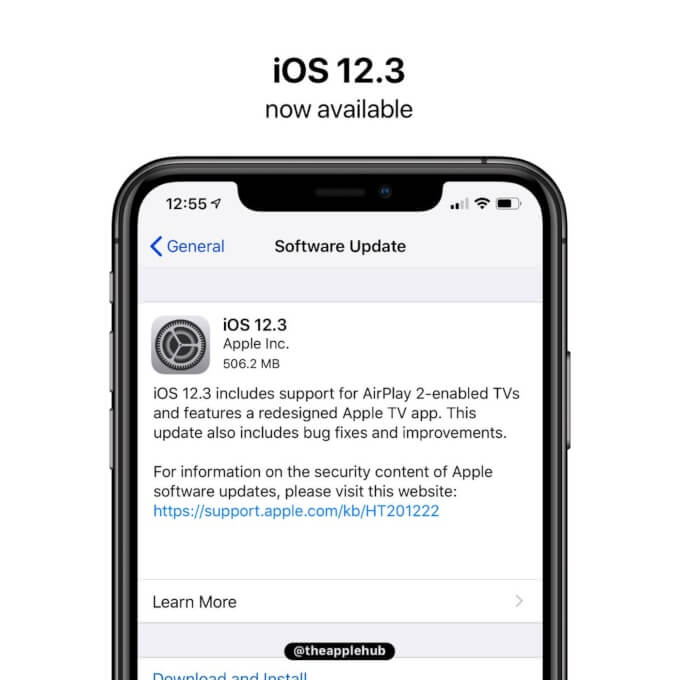
Download iOS 12.3 (final) for iPhone, iPad, and iPod 2019


WHAT’S NEW IN IOS 12.3?

iOS 12.3 (final) comes with a build number of 16F156 and weighs about 2.89GB on all compatible devices.

The main feature of this operating system update is the new all Apple TV app and the addition of AirPlay-centric features.


Check out the complete list of all improvements, fixes, and new features this update brings below.
APPLE TV APP


User interface completely redesigned with the addition of collections compiled by editors and personal recommendations.


Subscriptions can now be shared with up to six family members without any new applications, accounts, or passwords.


Buy or rent new releases, including a complete catalog of over 100,000 movies and the largest 4K HDR title selection.


Added support for AirPlay 2 on LG, Samsung, Sony, and Vizio TVs.
AIRPLAY 2


AirPlay 2 now supports sharing videos, photos, music, and more from iPhone and iPad directly to an AirPlay 2-enabled smart TV.


One-Click Playback automatically plays the selected TV show or movie on the most recently used device depending on time and location.


Siri’s suggestions for watching movies and TV shows now include AirPlay.
OTHER FIXES AND IMPROVEMENTS


Face ID is snappier.


The “For You” section in Apple Music is updated several times a day.


Fixes a bug in WiFi calls that caused calls to get interrupted.


Fixes a bug that could prevent Apple TV Remote from pausing/controlling video or adjusting volume on supported receivers.


Fixes a bug that did not show track information from a connected iPhone on the car display.

Since this is a final public update, you can get it straight from the “Software Update” section in Settings > General. Alternatively, you can use iTunes to upgrade your device or perform a clean restore using the IPSW links below.

Before you update, be sure to back up your data and charge your device.
IOS 12.3 IPSW DOWNLOAD
IPHONE


iPhone SE, iPhone 5s


iPhone 6s, iPhone 6


iPhone 6s Plus, iPhone 6 Plus


iPhone 8, iPhone 7


iPhone 8 Plus, iPhone 7 Plus


iPhone X


iPhone XS


iPhone XS Max


iPhone XR
IPAD


iPad Air, iPad mini 2


iPad mini 4, iPad Air 2, iPad mini 3


iPad (5th generation), iPad (6th generation)


iPad Pro (9.7‑inch)


iPad Pro (12.9‑inch)


iPad Pro (10.5-inch), iPad Pro (12.9-inch) (2nd generation)


iPad Pro (11-inch), iPad Pro (12.9-inch) (3rd generation)


iPad mini (5th generation), iPad Air (3rd generation)
IPOD


iPod touch (6th generation)
SHOULD YOU UPGRADE?

iOS 12.3 comes with a whole host of bug fixes, enhancements, and AirPlay/Apple TV-centric features. If your device is still running a beta version, we highly recommend updating to the latest update.

iOS 12.3 is most probably the last major iOS 12 update as the WWDC is just a few weeks away now.

Apple will still continue seeding developer beta builds until iOS 13 is released officially in September, nevertheless.

Sponsor ads:

Gihosoft RePicvid Free Photo Recovery Software provides a free photo recovery software for windows to help users recover the deleted or lost photo for free.

If you lost data after you updated to a new iPhone, you can always use Gihosoft iPhone Data Recovery to get the data back from the old iPhone or backup.You may also like: iphonerecovery.com

If you use android phones, please choose Gihosoft Android Data Recovery.With Gihosoft Android Data Recovery, no longer afraid of data loss!

iPhone Manager:Get the ultimate Gihosoft iPhone Manager. Free download for PC/Mac.

Tuesday, 23 April 2019

Apple Seeds iOS 12.3 Beta 3 to Developers [Updated]


In March, Apple officially released iOS 12.2 to the public. That software wasn’t a major upgrade, but it did welcome things like Apple News+ to the mix.

Update: Apple has seeded the corresponding public beta to public beta testers. The new software can be installed as an over-the-air update on registered devices.

The original article continues below.

Now, Apple is moving ahead with betas for the next update to its mobile operating system. Today, Apple officially seeded the third developer beta of iOS 12.3. This is appears to be a minor update in scale, with the company focusing primarily on behind-the-scenes bug fixes and general overall improvements. However, the company did lay the groundwork for the public launch of its revamped TV app later this year with the first developer beta. Now, with the third beta, Apple will continue to tweak the formula to get it ready for the public.

If any additional discoveries are made, we will update this post accordingly.

To update, developers that have registered their supported iOS devices simply need to open Settings –> General –> Software Update and then follow the onscreen instructions.

Apple typically kicks things off with a developer beta, but a corresponding public beta of the same software will likely launch in short order. If you don’t want to wait for the public beta, and want to try out the developer beta –but you aren’t a developer yourself– you can do so for free by following the method through this link.Sponsor ads:

Gihosoft RePicvid Free Photo Recovery Software provides a free photo recovery software for windows to help users recover the deleted or lost photo for free.

If you lost data after you updated to a new iPhone, you can always use Gihosoft iPhone Data Recovery to get the data back from the old iPhone or backup.You may also like: iphonerecovery.com

If you use android phones, please choose Gihosoft Android Data Recovery.With Gihosoft Android Data Recovery, no longer afraid of data loss!


Download iOS 13 and iPadOS 13 Beta 6

With the public release of iOS 13 and iPadOS 13 just over a month away, Apple today released the sixth developer beta of iOS 13 and iPadOS 1...