Friday, 15 March 2019

The best IPTV apps for your Android device


The best IPTV apps for your Android device
IPTV, or Internet Protocol television, is the platform that allows you to watch television channels via an Internet connection. In order to do this, you'd usually need to register for certain online services or download software to your PC. But how can you enjoy your favorite channels on your smartphone? As usual, the solution to all this is apps!

In this useful guide we will show you, in our opinion, the best IPTV apps currently available on Google Play Store which you can install on your Android device, smartphone or tablet. Of course, we remind you that, in order to take advantage of these apps, your device must be connected to the Internet via Wi-Fi or mobile data (watch out for consumption).
GSE SMART IPTV

This completely free application (with optional in-app purchases) allows you to watch TV channels via streaming, using lists in M3U or JSON format, and which you can upload via HTTP or FTP links. The interface is very intuitive, allows you to check out the television guide (EPG) and contains an integrated video player full of useful commands for certain functions. There is also the possibility of transmitting content from your smartphone to your TV via Chromecast or Apple TV.

GSE SMART IPTV

IPTV Extreme

IPTV Extreme is one of the most downloaded and appreciated apps in this category. Free, simple and intuitive, it offers all the features you'd expect. Every user can find what they need when they want to enjoy a little TV on their smartphone. Here, we also find an integrated video player, support for Google Chromecast, a Parental Control function, support for M3U lists and automatic updates of the EPG.

IPTV Extreme

TVCast

TVCast differs from the others on this thanks to its simple and minimal interface in line with Google's Material Design, which leaves no room for doubt. It supports both M3U and M3U8 and is available free of charge. As you may have guessed from the name, this application is oriented to content casting: in fact, it can broadcast the contents of its channel list on a variety of devices, including Amazon Fire TV, Roku, Apple TV, Chromecast and the TVCast Web Player (the proprietary software to be able to transmit to your PC).

The minimalist design of the interface is what makes TV cast stand out. / © Play StoreTVCast - Watch IPTV everywhere
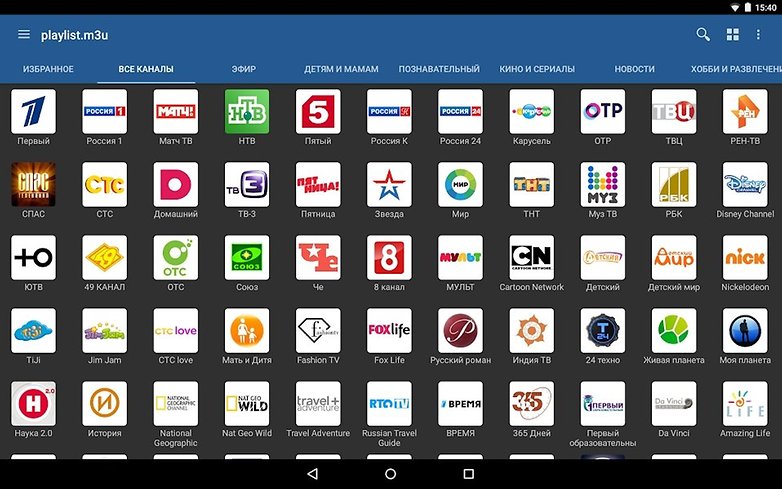
IPTV

The name of this application is practically a guarantee for variety. Although it does not have the most beautiful graphical interface ever, IPTV is the preferred app for over 10 million users. Among its best features, you will find frequent updates, speed, excellent integrated player, support for M3U and XSPF lists, support for EPG, the option to display the channel list in three modes (list, grid or titles) and automatic reconnection in case of buffering or blocks.
IPTV is the favorite app for over 10 million users. / © Play StoreIPTV

Which is your app of choice when it comes to watching TV channels on your smartphone or tablet? Let us know in the comments below.Also Read:jihosoft Free iPhone Data Recovery

Sponsor ads:

Gihosoft Free iPhone Data Recovery:https://www.gihosoft.com/iphone-data-recovery-free.html

Gihosoft iPhone Data Recovery Free

Free iPhone Data Recovery Software for Windows/Mac

Recover up to 12+ types of files, including contacts, SMS, photos, WhatsApp, Viber, notes, etc.

Restore lost data from iOS devices directly or from iTunes and iCloud backup

Recover iPhone data lost due to iOS upgrade/jailbreak, accidental deletion, device lost or broken

Support all the latest iPhone, iPad and iPod Touch

Both Free and Pro version.

If you lost data after you updated to a new iPhone, you can always use Gihosoft iPhone Data Recovery to get the data back from the old iPhone or backup.You may also like: iphonerecovery.com

If you use android phones, please choose Gihosoft Android Data Recovery.

With Gihosoft Android Data Recovery, no longer afraid of data loss!

Must read:Youtube video downloader for pc

Gihosoft RePicvid Free Photo Recovery Software provides a free photo recovery software for windows to help users recover the deleted or lost photo for free.

Jihosoft Android Data Recovery: the best Android Data Recovery software for Windows and Mac to recover deleted contacts, messages, photos, videos, WhatsApp and etc from Android devices.Tips:How to transfer messages from iPhone to iPhone

Jihosoft File Recovery:Recover deleted, Lost, formatted, or corrupted files from PC, flash drive and memory card easily & safely

Tuesday, 12 March 2019

Apple Says Someone Tried to Sway the Testimony of Its Former Engineer in Ongoing Qualcomm Case

Apple Says Someone Tried to Sway the Testimony of Its Former Engineer in Ongoing Qualcomm Case


The ongoing legal battle between Apple and Qualcomm has been full of twists and turns. As per Apple, the tech for one of the patents Qualcomm alleges Apple has infringed was helped co-founded by one of the company’s former engineers. However, Arjuna Siva, former Apple engineer, in his testimony said that while he contributed ideas to the technology, he does not claim to be an inventor.

Now, Apple says that they have reason to believe that someone tried to sway Siva’s testimony, though the company does not know who.

In a filling on Tuesday, Apple counsel Juanita Brooks wrote that the iPhone maker had grounds to suspect someone was trying to sway Arjuna Siva’s testimony, though she said the company doesn’t know who. The iPhone maker has argued that Siva, a former Apple engineer, co-invented technology in one of three disputed Qualcomm patents and should be named on it.

Apple had made a similar claim last week which Qualcomm called out as “ridiculous.” Judge Dana Sabraw also said that there was “no evidence” on the basis of which Apple was making the allegation.

Siva’s appearance in the court itself has been full of drama. He first backed out of his appearance after retaining a new lawyer, Matt Warren, who suggested that he does not attend the hearing unless subpoenaed. Warren was previously one of the partners at the law firm Quinn Emanuel which currently represents Qualcomm. This led Apple to file subpoenas for both Siva and Warren to appear in the court.

The patent in question revolves around how quickly a phone connects to the internet after booting up. As per Apple, their engineer Arjuna Siva came up with the idea before the release of the first iPhone in 2011 featuring a Qualcomm chip. Apple and Qualcomm were then working on a modem that met its requirements and could be used in its devices.

Despite Apple’s initial claims about someone trying to sway Siva’s testimony, Apple’s counsel Brooks said that the engineer’s testimony has been consistent with original plans so they see no reason for “further action”

[Via Cnet]Also Read:jihosoft Free iPhone Data Recovery

Sponsor ads:

Gihosoft Free iPhone Data Recovery:https://www.gihosoft.com/iphone-data-recovery-free.html

Gihosoft iPhone Data Recovery Free

Free iPhone Data Recovery Software for Windows/Mac

Recover up to 12+ types of files, including contacts, SMS, photos, WhatsApp, Viber, notes, etc.

Restore lost data from iOS devices directly or from iTunes and iCloud backup

Recover iPhone data lost due to iOS upgrade/jailbreak, accidental deletion, device lost or broken

Support all the latest iPhone, iPad and iPod Touch

Both Free and Pro version.

If you lost data after you updated to a new iPhone, you can always use Gihosoft iPhone Data Recovery to get the data back from the old iPhone or backup.You may also like: iphonerecovery.com

If you use android phones, please choose Gihosoft Android Data Recovery.

With Gihosoft Android Data Recovery, no longer afraid of data loss!

Must read:Youtube video downloader for pc

Gihosoft RePicvid Free Photo Recovery Software provides a free photo recovery software for windows to help users recover the deleted or lost photo for free.

Jihosoft Android Data Recovery: the best Android Data Recovery software for Windows and Mac to recover deleted contacts, messages, photos, videos, WhatsApp and etc from Android devices.Tips:How to transfer messages from iPhone to iPhone

Jihosoft File Recovery:Recover deleted, Lost, formatted, or corrupted files from PC, flash drive and memory card easily & safely

Monday, 11 March 2019

Apple Announces ‘It’s Show Time’ Event on March 25; Expected to unveil TV Streaming and News Subscription Service


Apple has sent out media invites for its “It’s Show Time” event that will be held on March 25 at the Steve Jobs Theater in California. The event will start at 10:00 a.m. Pacific Time.

The tagline of the event makes it clear that Apple will be using the event to showcase its TV streaming service and premium Apple News subscription service.

The TV streaming service will only be announced by Apple during the event, with its actual launch still a few months away. The company is already working on over 2 dozen original TV shows and content for its streaming service which includes major stars like Reese Witherspoon, Jennifer Aniston, Steve Carell, and more.
Also Read:4 Easy Ways To Know if Your iPhone Is Locked Or Unlocked
Also Read:How to Make Your Phone Number Private on Android or iPhone
Also Read:HTC Sync Manager ReviewAlso Read:How to Recover Formatted Hard Drive for Lost Files

View image on Twitter


Matthew Panzarino

✔@panzer

Please join us for an Apple special event

at the Steve Jobs Theater in Cupertino.


March 25, 2019

10:00 a.m.


The email played a short film reel countdown animation on opening.

1,562

3:20 AM - Mar 12, 2019

588 people are talking about this

Twitter Ads info and privacy

As for the Apple News subscription service, reports point to Apple charging customers $9.99/month for it and giving them access to content from major publications and magazines. As of now, it is still unclear which publishers are onboard Apple’s premium News service offering as its 50 percent revenue split demand has left.

Apple could also possibly talk about the AirPods 2, AirPower, iPad mini 5, and the 7th gen iPad at the event. Even if it does not, these devices should go on pre-order or sale right after the event. Apple is focusing more on its Services business with this event so it is unlikely that we will see the company make any hardware announcements on stage.

Like other Apple events, the company will also be streaming this event on its website for interested folks to see from all over the world.

Are you excited about Apple’s March 25th event? Let us know in the comments below.Also Read:8 Best To-do List Apps for Your iOS Device to Make Your Work Done
Also Read:Windows 10 Blue Light Filter: Learn Something about Your Eyes Saver

Also Read:Top 5 Best Free File Recovery Software 2019 for Windows and Mac

18 Best Indian Web Series on YouTube You Can’t Miss 2019
Also Read:3 Ways to Use WhatsApp without a Phone Number or SIM in 2019


Like this post? Share it!

Monday, 4 March 2019

How to Transfer Music from iPad to Computer with iTunes? 2019 Guide


How to Transfer Music from iPad to Computer with iTunes?

Not convinced that iMyFone TunesMate is for you? No problem - this short guide will show you how to transfer songs from your iPad music library to computer with iTunes.

Step #1 - Install iTunes on your computer (if it isn’t already installed) and launch the program.

Step #2 - After connecting your iPad, click the device icon at the top of iTunes and select the “Music” menu from the sidebar.

Step #3 - Click on the “Sync Music” box to enable this option and select either “Entire music library” or “Selected playlists, artists, albums, and genres”.


Step #4 - Hit the “Apply” button at the bottom-right.

Step #5 - From now on, each time you sync your iPad with iTunes your music will be transferred.

As always there are a few disadvantages to using iTunes, but if you don’t have a problem using it then here you go!

Also Read:jihosoft Free iPhone Data Recovery

Sponsor ads:

Gihosoft Free iPhone Data Recovery:https://www.gihosoft.com/iphone-data-recovery-free.html

Gihosoft iPhone Data Recovery Free

Free iPhone Data Recovery Software for Windows/Mac

Recover up to 12+ types of files, including contacts, SMS, photos, WhatsApp, Viber, notes, etc.

Restore lost data from iOS devices directly or from iTunes and iCloud backup

Recover iPhone data lost due to iOS upgrade/jailbreak, accidental deletion, device lost or broken

Support all the latest iPhone, iPad and iPod Touch

Both Free and Pro version.

If you lost data after you updated to a new iPhone, you can always use Gihosoft iPhone Data Recovery to get the data back from the old iPhone or backup.You may also like: iphonerecovery.com

If you use android phones, please choose Gihosoft Android Data Recovery.

With Gihosoft Android Data Recovery, no longer afraid of data loss!

Must read:Youtube video downloader for pc

Gihosoft RePicvid Free Photo Recovery Software provides a free photo recovery software for windows to help users recover the deleted or lost photo for free.

Jihosoft Android Data Recovery: the best Android Data Recovery software for Windows and Mac to recover deleted contacts, messages, photos, videos, WhatsApp and etc from Android devices.Tips:How to transfer messages from iPhone to iPhone

Friday, 1 March 2019

Add Storage to iPad? Find Tips Here!


Method 1: Upgrade Storage of iCloud

Upgrade storage of iCloud is also a great idea to add storage to iPad. By default, you have 5GB storage on iCloud. If you are willing to spend a few bucks, then it is recommended that you upgrade your iCloud storage by buying a suitable storage plan. An upgraded storage plan will allow you to save more media while paying as little as $0.99/month for 50GB of iCloud storage. Follow these steps to buy more iCloud storage:


Open Settings app on your iPad.


Navigate to Apple ID > iCloud > Manage Storage.


Now select Change Storage Plan option.


Choose the plan according to your needs and then tap Buy to purchase the selected iCloud storage plan.


Method 2: Use a Wireless Hard Drive

Adding another hard drive is one of the most traditional ways to expand storage. However, since iPad cannot work with traditional USB external drives, you will need to buy a wireless hard drive to expand the storage. Wireless hard drives can communicate with your iPad through a secured Wi-Fi connection and are a great way to add storage to your iPad. You can save your entire iPad media collection on the wireless hard drive and then easily access it whether you are in the house or away from home. Most wireless hard drives support uploading documents, photos, and videos.
Method 3: Erase Some Media Files

Media files, particularly videos and music take a lot of space. Erasing such content from your iPad can really help free up space and make room for other things.


Open Settings app on your iPad.


Navigate to General > Usage > Manage Storage.


Now select the Videos app and review your videos. Each video stored on your iPad will be shown in this section along with the size.


Select a video, tap Edit and then select '-' icon next to it. The video will be deleted.


Similarly, you can erase your music and photos as well.


Don't Miss: 5 Practical Tips to Fix iPad Storage Almost Full Problem
Bonus Tip: How to Check the Storage on iPad?

Every iDevice has a built-in feature that monitors the storage of the device and analyzes which content is using how much space. With this feature, you can easily check the storage on your iPad.

Follow these instructions:


Open Settings app on your iPad.


Navigate to General > [Device] Storage. There, you will see a list of apps installed on your iPad as well as how much storage each of the app is using.


You can get more information about the storage usage of an app by tapping its name.


Also Read:4 Best Chrome Extensions to Download YouTube Videos
Also Read:Top 5 Legal Websites to Download Free Ringtones for iPhone XS/X/8/7/6s/6
Also Read:How to Go Live on Tik Tok/Musical.ly in 2019

How to Tell If Someone is Tracking Your iPhone 2019

How to Tell If Someone is Tracking Your iPhone 2019

Do you suspect that someone is tracking your iPhone? With so many ways to track data on mobile devices, you may be justified in your paranoia. But how can you tell for sure? Well, there are several ways you can detect the presence of spy software on your device. For someone to track your iPhone and have access to your iPhone’s data, they may need to install spy software on your device.

In this article, we will share with you several ways on how to tell if someone is tracking your iPhone and how to remove it to prevent the tracking action in the future.
1. How to Tell if Your iPhone is Being Tracked

There are several indicators that can point towards the presence of spy software on your iPhone. Some of the most common ones include the following:
Noise During a Call

Hearing background noise when making or receiving a call can be as a result of a poor connection. But it can also be an indicator that spy software is installed on your device. This is because some spy software can record phone calls which can cause the noises you hear during a call. These noises can range anywhere from beeping, static, clicking and even actual voices.


More Power Consumption

Spy software installed on your device may also cause a sudden increase in battery usage. If you notice that you all of a sudden have to charge you battery more often than you use to, it is very likely that someone is tracking your iPhone. Although this is an indicator, it is worth noting that your battery life will diminish as your device gets older. What you need to watch out for is sudden battery drains.


Increase in iPhone Data Usage

If you have noticed a sudden spike in the data usage on your iPhone, this is also an indicator of the presence of spy software on your device. There are certain types of Spy software that require an internet connection to send the collected data to whoever is tracking your device. This process may require a lot of data. To assess the amount of data being used, use an app like Data Usage for iPhone to track your data usage.
iPhone Shuts Down Randomly

Does your iPhone sometimes shutdown even when it is fully charged. If this happens a lot, you might want to check the device for unwanted spy software. Low-quality spy software can cause your device to malfunction, thereby causing it to shut down at inopportune moments.
2. How to Delete Tracking Apps

If your iPhone is exhibiting all of the symptoms we’ve mentioned above, it is very likely that someone is tracking your iPhone location or iPhone data. The obvious thing to do to prevent someone from tracking your device is to remove the spy software on your device. Doing that is not as easy as uninstalling an app like you would ordinarily, but there are several steps you can take to remove them. They include the following:
Change to a Strong Password

One of the easiest ways to stop someone from tracking your iPhone is to change the password you’re using. Keep in mind that this will not remove any tracking or spy app that may be installed on your device, but it will keep it from sending any information to the person tracking you.

It is important to ensure that the password you chose is very strong. We have the tendency to use the same password for all accounts and while this may be easy, it does open up all your devices to hacking and other security issues. When you change your password ensure you do so for every service you’ve signed into on our iPhone and also make sure that no one can access it.
Upgrade iOS Version

Upgrading your device to the latest iOS 12 can stop the tracking app from working correctly. This is especially true if the tracking app was compatible with the older version of iOS. Upgrading your iOS can also have the effect of removing certain apps and settings that could be harmful to the device and may very well eliminate the tracking app on your device.


Refresh the Device

If there is no update, the next best thing to eliminate the tracking app from your system would be to refresh the device by doing a factory reset. This is the most effective way to remove the tracking app since a factory reset will remove all apps and settings from the device.

It is important to ensure that you have a backup of all the data on your device before attempting a factory reset. You should also note that a factory reset may void the warranty on your device.

To factory reset an iPhone, follow these simple steps:

Step 1: Make sure that you have an iCloud or iTunes backup of the data on your device. If you don’t have the backup, take a moment to create one. Go to Settings >iCloud > Backup and ensure iCloud Backup is turned on before tapping “Back Up Now.” Or plug in the device to your computer and create a backup in iTunes.

Step 2: With a Backup of all your data, go to Settings > General > Reset and then tap “Erase All Contents and Settings.

Step 3: Enter your passcode when prompted and then tap on “Erase iPhone.”

You may need to enter your Apple Password to complete the process. Once it is done, the iPhone will go back to the Set-up screen. Set it up as new and restore it from a backup. The tracking app should no longer be on the device.


Tracking apps can be installed on your device without your knowledge. But now you know the signs to look out for and how to eliminate them should you find them.

Sponsor ads:

Gihosoft Free iPhone Data Recovery:https://www.gihosoft.com/iphone-data-recovery-free.html

Gihosoft iPhone Data Recovery Free

Free iPhone Data Recovery Software for Windows/Mac

Recover up to 12+ types of files, including contacts, SMS, photos, WhatsApp, Viber, notes, etc.

Restore lost data from iOS devices directly or from iTunes and iCloud backup

Recover iPhone data lost due to iOS upgrade/jailbreak, accidental deletion, device lost or broken

Support all the latest iPhone, iPad and iPod Touch

Both Free and Pro version.

If you lost data after you updated to a new iPhone, you can always use Gihosoft iPhone Data Recovery to get the data back from the old iPhone or backup.You may also like: iphonerecovery.com

If you use android phones, please choose Gihosoft Android Data Recovery.

With Gihosoft Android Data Recovery, no longer afraid of data loss!

Must read:Youtube video downloader for pc

Gihosoft RePicvid Free Photo Recovery Software provides a free photo recovery software for windows to help users recover the deleted or lost photo for free.

Jihosoft Android Data Recovery: the best Android Data Recovery software for Windows and Mac to recover deleted contacts, messages, photos, videos, WhatsApp and etc from Android devices.Tips:How to transfer messages from iPhone to iPhone


jihosoft Free iPhone Data Recovery

Download iOS 13 and iPadOS 13 Beta 6

With the public release of iOS 13 and iPadOS 13 just over a month away, Apple today released the sixth developer beta of iOS 13 and iPadOS 1...